A presentation can fail for two reasons. The first is weak structure. The second is poor visuals.
Many AI presentation tools solve part of the problem. They can generate slides quickly, but the result often feels like a rough draft. The deck may have a basic outline, but the images can look too generic. Sometimes the visual style changes from slide to slide. Sometimes the image looks nice, but does not really support the point of the slide.
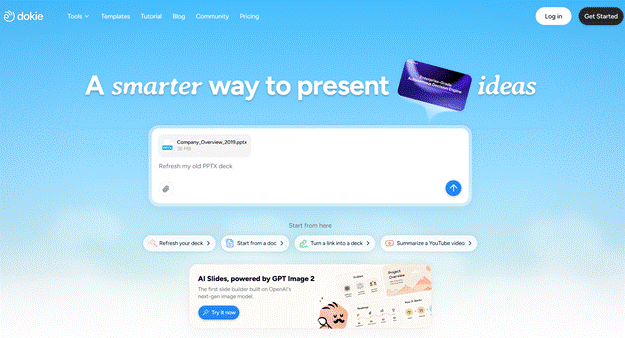
Dokie AI takes a more practical approach. It helps users create PowerPoint-style presentations with a clearer structure and editable slide output. Now, with GPT Image 2 support, Dokie AI also improves the visual side of the presentation workflow.
This makes the tool more useful for people who need presentations that are not only fast to create, but also good enough to share, edit, and present.
Dokie AI is an AI PPT maker that turns prompts, notes, documents, or existing content into presentation drafts. Users can start with a topic, describe the type of deck they need, and use Dokie AI to generate slides with a more organized flow.
It can be used for many presentation types, including business reports, marketing plans, startup pitch decks, education slides, training materials, product presentations, client proposals, and personal portfolio decks.
The goal is not to remove all editing. Instead, Dokie AI gives users a better starting point. You can generate the structure, get slide content, choose a template, review the logic, and then add your own data, examples, screenshots, or final edits.
For many users, this saves the most painful part of presentation creation: starting from a blank page.
Why GPT Image 2 Support Matters
The most important update in Dokie AI is its support for GPT Image 2.
This matters because presentations are highly visual. A slide does not only communicate through text. The image, layout, and visual tone all affect how professional the deck feels.
Before this kind of upgrade, many AI-generated decks had a common issue: the images looked like placeholders. They were usable, but not impressive. Some were too broad. Some looked unrelated to the slide title. Some made the deck feel like a quick AI draft instead of a serious presentation.
With GPT Image 2 support, Dokie AI can create stronger images that feel more connected to the presentation topic. The visuals are more detailed and more suitable for slide use. This helps the final deck feel more complete.
Stronger Visuals for Business Slides
Business presentations need visuals that support the message. They should not distract from the content.
Dokie AI’s GPT Image 2 support is useful for business decks because it can generate images that better match topics like strategy, growth, productivity, teamwork, market analysis, customer experience, product planning, and digital transformation.
For example, if a slide explains a go-to-market plan, the visual should feel related to marketing execution or business growth. If a slide explains workflow automation, the image should help the audience understand technology, process, or efficiency. If a slide talks about customer pain points, the visual should support the business context.
This kind of relevance makes slides feel more intentional. The images are not just decoration. They help the audience understand the point faster.
Better First Drafts for Pitch Decks
Pitch decks are one of the most important use cases for Dokie AI.
A startup pitch deck needs a clear story. It should explain the problem, solution, product, market, business model, traction, team, and ask. If the structure is confusing, the deck will not work. If the visuals look weak, the deck may feel less convincing.
Dokie AI helps with both parts. It can generate a pitch deck structure and now create better visuals with GPT Image 2 support.
This is useful for founders who need to move quickly. They can create a first draft, review the storyline, add real traction data, include product screenshots, and polish the final version. The AI-generated visuals can help the first version feel more complete before manual editing.
More Useful Marketing Presentations
Marketing teams often create many decks: campaign plans, SEO reports, social media strategies, influencer marketing proposals, product launch decks, and performance reviews.
These decks need both logic and visual clarity. A marketing deck may include goals, audience insights, channel plans, creative ideas, campaign timeline, results, and next steps.
Dokie AI can help organize these sections into a clear presentation. GPT Image 2 support then improves the visuals, making slides feel more polished and easier to scan.
This is useful for internal reporting and client-facing presentations. Instead of spending too much time searching for images or fixing slide visuals, marketers can focus on insights, numbers, and recommendations.
Helpful for Education and Training
Dokie AI is also useful for education and training slides.
Teachers, students, and trainers often need to explain ideas clearly. A good education deck should not be too text-heavy. It should include simple structure, examples, and visuals that help the audience understand the topic.
GPT Image 2 support helps here because better visuals can make learning content easier to follow. Whether the topic is science, business, technology, history, health, or communication, more relevant images can make slides more engaging.
For students, this can save time when creating class presentations. For teachers and trainers, it can help create materials faster without starting from scratch.
Clearer Structure, Not Just Better Images
The GPT Image 2 upgrade is important, but Dokie AI is not only an image generator.
Its real value comes from combining better visuals with better presentation structure.
A strong deck needs a logical order. It should introduce the topic, explain the key points, support them with details, and end with a clear takeaway. Dokie AI helps users create this flow faster.
For example, a business report can move from summary to key metrics, then insights, risks, and next steps. A product deck can move from user problem to product value, features, use cases, roadmap, and call to action. A marketing plan can move from goals to audience, strategy, channels, timeline, budget, and KPIs.
This structure makes the presentation easier to edit and easier to present.
Templates for Different Scenarios
Dokie AI also provides PPT templates for different presentation needs.
Users can choose templates for business, education, marketing, medical, technology, pitch deck, about me, and infographics. This helps users start from a more suitable design direction instead of forcing every deck into the same style.
A business report needs a clean and professional look. A pitch deck needs a stronger storytelling layout. An education deck needs readable and simple slides. An infographic deck needs visual structure for data, processes, or timelines.
The template library makes Dokie AI more flexible for different users and use cases.
Free PPT Tools for Existing Content
Another practical part of Dokie AI is its free PPT tools.
Dokie AI supports tools such as PDF to PPT, Word to PPT, Text to PPT, Excel to PPT, JPG to PPT, PNG to PPT, HTML to PPT, and DOC to PPT.
This is useful because many presentations do not start from a fresh prompt. Sometimes you already have a PDF report, a Word document, a spreadsheet, a text outline, an image, or a web page. Dokie AI helps turn that existing content into a presentation workflow faster.
This makes the product useful not only for creating new decks, but also for repurposing existing materials into slides.
The strongest part of Dokie AI is that it understands presentation creation as a workflow.
It helps with structure, slide content, templates, visuals, and file-to-PPT conversion. This makes it more practical than a tool that only generates a few slide images.
GPT Image 2 support also makes the output feel more polished. The visuals are better suited for professional slides, which improves the overall quality of the first draft.
The tool is especially useful for users who create presentations often and want to reduce repetitive work.
Dokie AI can create a strong first draft, but users should still review the final deck carefully.
AI-generated content may need fact-checking, rewriting, and data replacement. Important business decks still need real numbers, examples, screenshots, and final polish.
For high-stakes presentations, such as investor decks, executive reports, or client proposals, users should treat Dokie AI as a starting point rather than a final one-click solution.
The better your input is, the better the output will be. A detailed prompt with audience, goal, slide count, and key points will usually produce a much better result than a vague topic.
Dokie AI is a good fit for office workers who make reports, team updates, and meeting decks.
It is useful for marketers who need campaign reports, launch plans, SEO summaries, and strategy presentations.
It works well for founders who need pitch decks, investor updates, product decks, and business proposals.
It can help teachers, students, and trainers create lessons, class projects, research presentations, and training decks.
It is also useful for consultants, agencies, sales teams, product teams, and anyone who needs to turn ideas or documents into slides quickly.
Dokie AI is a strong AI PPT maker for users who care about both structure and visual quality.
Its support for GPT Image 2 makes a clear difference. The generated visuals look more polished, more relevant, and more suitable for professional presentations. This helps the final deck feel less like a rough AI draft and more like something users can actually edit, share, and present.
At the same time, Dokie AI’s structure-focused workflow makes it useful for real presentation tasks, such as reports, pitch decks, marketing plans, education slides, product decks, and client proposals.
It still needs human review, especially for important decks. But as a tool for creating better first drafts faster, Dokie AI is worth trying.
1. What is Dokie AI?
Dokie AI is an AI presentation maker that helps users create editable PowerPoint-style decks from prompts, notes, documents, and existing content.
2. Does Dokie AI support GPT Image 2?
Yes. Dokie AI supports GPT Image 2, which helps improve the quality, relevance, and consistency of images generated for presentation slides.
3. Is Dokie AI good for business presentations?
Yes. Dokie AI is useful for business reports, strategy decks, marketing plans, client proposals, product presentations, and pitch decks.
4. What makes Dokie AI different from basic AI slide tools?
Dokie AI focuses on structured PPT-style presentations, not just quick slide generation. It also supports GPT Image 2 for better visuals and offers templates and free PPT tools.
5. Does Dokie AI still need manual editing?
Yes. Dokie AI can create a strong first draft, but users should still review the content, add real data, and polish important slides before presenting.




Be First to Comment